Getting Started
Three quick steps stand between you and your first call to the Cogneris API — mint a key in the platform, set the Authorization header on your requests, and POST a document.
What you will do
Generate a key
Create your API key from Vision → Developers → API Keys in the platform. Plaintext is shown only once.
Authenticate
Send the key on the Authorization header as a Bearer token on every request.
Call an endpoint
POST a document as multipart/form-data and read the JSON envelope back.
Step by step
Open the API Keys page
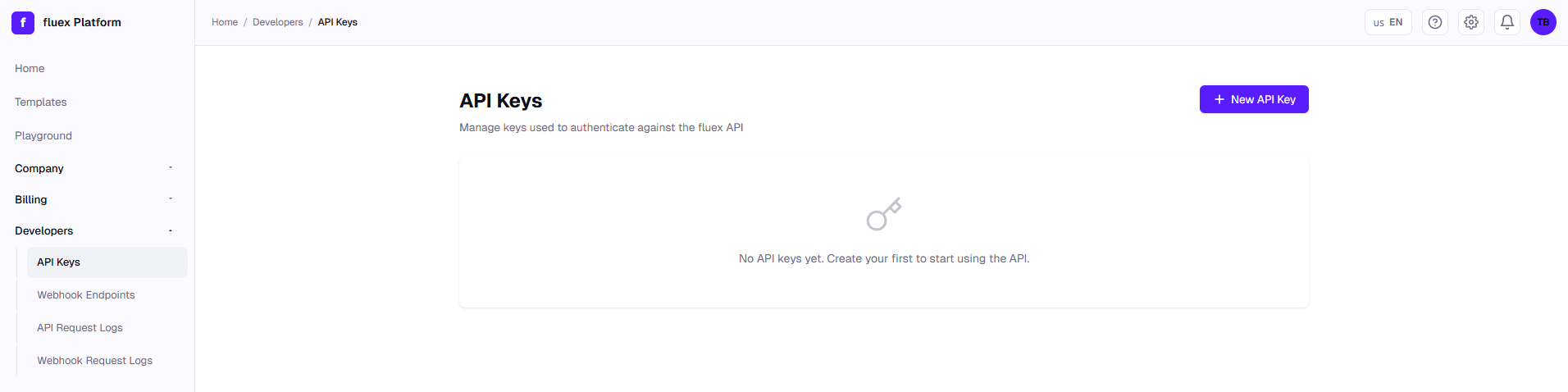
After signing in to the platform, open Vision and, in its left-side navigation, go to Developers → API Keys.
Create a new key
Click the New API Key button at the top right of the page.
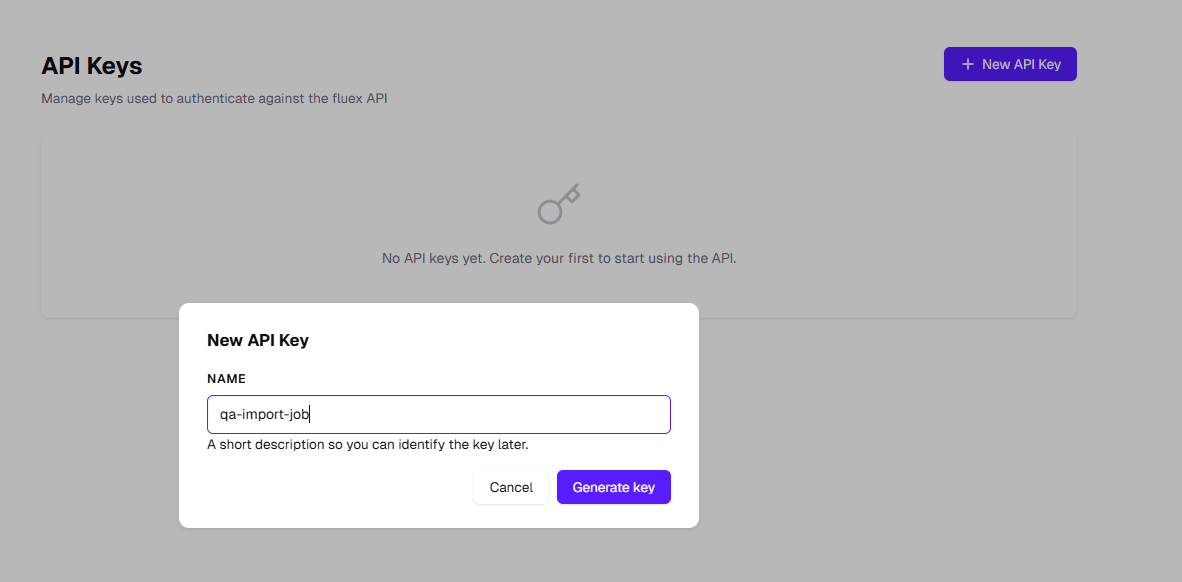
A dialog will open asking for a name for the key. Use something descriptive — for example, the integration or environment that will consume it (production-erp, qa-import-job, etc.). Choose the Environment: Production keys start with xtkt_live_ and are the only ones the synchronous /Document/* endpoints accept; Sandbox keys start with xtkt_test_ and cover only the asynchronous job flow. Then click Generate key.
Copy the plaintext key
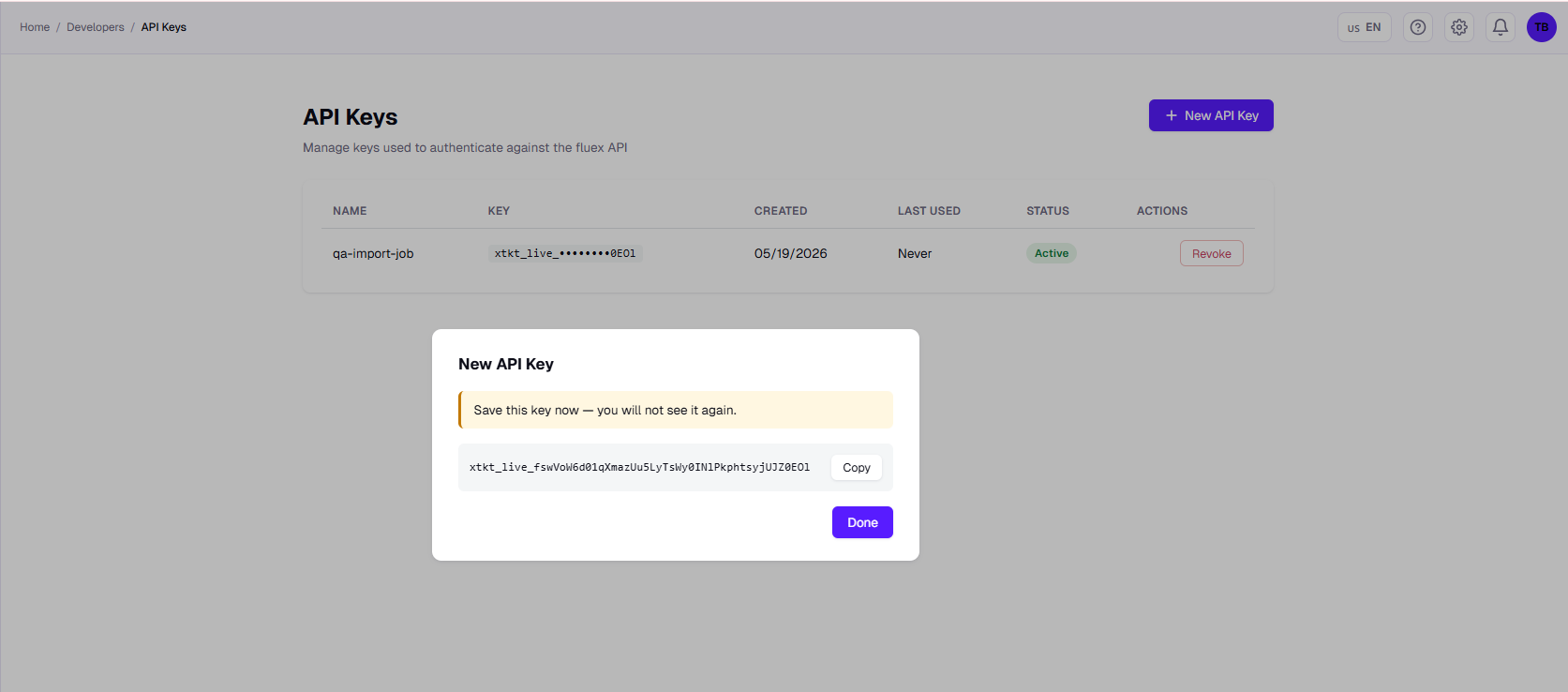
The platform shows the plaintext value only once. It starts with xtkt_live_ followed by a random string. Use the Copy button and store it in your secrets manager — after closing the dialog you will only see the masked form (xtkt_live_••••••••1a4f).
Manage existing keys
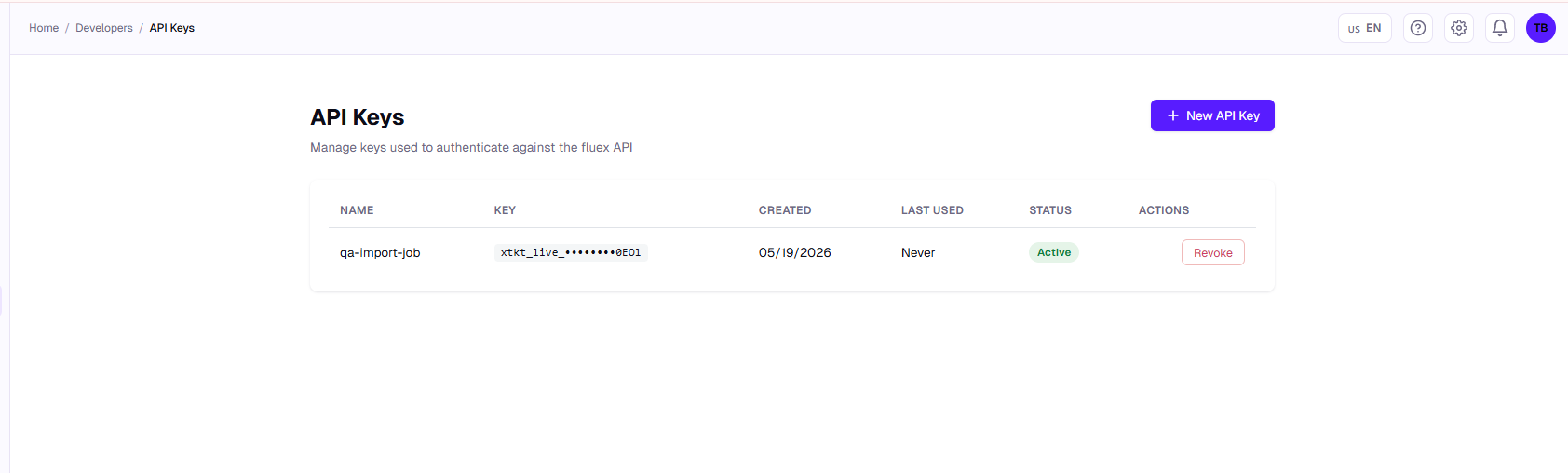
Back on the listing you will see every key with its name, masked value, creation date, last-used timestamp and status. Use the Revoke action to invalidate a key — revoked keys return 401 Unauthorized from the API.
If you lose it, revoke the key and generate a new one — the platform does not let you retrieve a plaintext key again.
Authenticate your requests
The Cogneris API uses the standard Authorization: Bearer <token> scheme, with the key you just generated as the token:
Authorization: Bearer <your API key>
Keep the key out of your source code. The examples below read it from the COGNERIS_API_KEY environment variable:
export COGNERIS_API_KEY="<your API key>"
They call https://api-eu.cogneris.ai, the API host for tenants in Europe, where new tenants are created. If your tenant lives in the United States, use https://api-us.cogneris.ai instead. A key works only in the region of its tenant.
There is no x-tenant header to send — the tenant is resolved from the key itself.
Minimal example — curl
curl -X POST "https://api-eu.cogneris.ai/Document/extraction" \
  -H "Authorization: Bearer $COGNERIS_API_KEY" \
  -F "file=@./invoice.pdf"
Minimal example — Python (requests)
import os
import requests

API_KEY = os.environ["COGNERIS_API_KEY"]
BASE_URL = "https://api-eu.cogneris.ai"

with open("invoice.pdf", "rb") as fp:
    response = requests.post(
        f"{BASE_URL}/Document/extraction",
        headers={"Authorization": f"Bearer {API_KEY}"},
        files={"file": ("invoice.pdf", fp, "application/pdf")},
    )

response.raise_for_status()
print(response.json())
Minimal example — Node.js (fetch + FormData)
import fs from "node:fs";

const API_KEY = process.env.COGNERIS_API_KEY;
const BASE_URL = "https://api-eu.cogneris.ai";

const form = new FormData();
form.append("file", new Blob([fs.readFileSync("./invoice.pdf")]), "invoice.pdf");

const response = await fetch(`${BASE_URL}/Document/extraction`, {
  method: "POST",
  headers: { Authorization: `Bearer ${API_KEY}` },
  body: form,
});

console.log(await response.json());
Minimal example — C# (HttpClient)
var apiKey = Environment.GetEnvironmentVariable("COGNERIS_API_KEY")
    ?? throw new InvalidOperationException("Set COGNERIS_API_KEY.");
using var http = new HttpClient { BaseAddress = new Uri("https://api-eu.cogneris.ai") };
http.DefaultRequestHeaders.Authorization =
    new AuthenticationHeaderValue("Bearer", apiKey);

using var form = new MultipartFormDataContent();
await using var fileStream = File.OpenRead("invoice.pdf");
var fileContent = new StreamContent(fileStream);
fileContent.Headers.ContentType = new MediaTypeHeaderValue("application/pdf");
form.Add(fileContent, name: "file", fileName: "invoice.pdf");

var response = await http.PostAsync("/Document/extraction", form);
var body = await response.Content.ReadAsStringAsync();
Console.WriteLine(body);
Common authentication errors
| HTTP status | When it happens |
|---|---|
401 Unauthorized | Header missing or malformed, or the key is unknown, revoked or expired. Both xtkt_live_ (production) and xtkt_test_ (sandbox) keys are accepted when they are valid and active. |
403 Forbidden | Code environment.sandbox_route_unavailable: a sandbox key (xtkt_test_) called a /Document/* endpoint, which needs a production key (xtkt_live_). Otherwise the key is valid but lacks a required scope, or the tenant has no active subscription for the operation. |
429 Too Many Requests | API key exceeded the 50 requests/minute rate limit. Retry after a short backoff. |
You are ready to call any endpoint listed in the API Reference.